You upload
- Colour, texture and motif read from the cloth
- Cut to kurta construction rules
- Photographed on your chosen model
You get
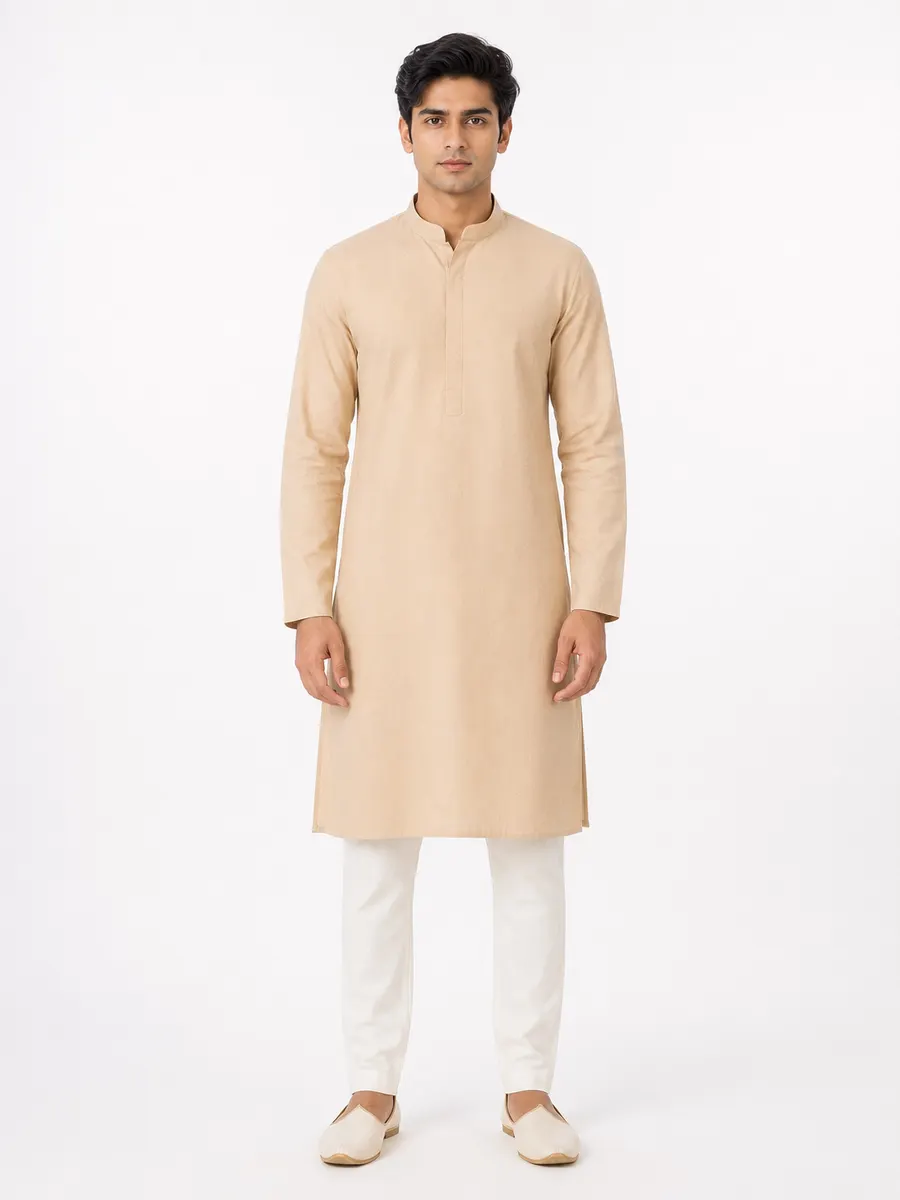
Example output. Generated figure, not a real person.
What is an AI kurta photoshoot?
An AI kurta photoshoot generates catalog photographs of a kurta on a human figure without booking a model, a studio or a photographer. You supply one reference image — a length of fabric, a flat-lay of the stitched kurta, or a hanger shot — and the generator produces studio-lit photographs of that same cloth worn as a kurta.
The difference between a usable result and a novelty is whether the system understands kurta construction. A kurta is not a shirt with a long hem: it is one front panel and one back panel joined at the shoulder and side seams, opening at a short front placket, slit from mid-hip down. Vastram Studio generates against that construction description rather than against the word “kurta”, which is why the placket, the collar band and the slits land where a tailor would put them.
The hard part
Where kurta photos usually go wrong
These are the failures a buyer notices before they notice anything else — and the reason a generic image tool isn't enough for garment work.
The placket breaks the print
Borders belong on edges, not on the body
Motif scale drifts
Construction
How Vastram Studio cuts a kurta
The kurta profile the generator works from describes the garment the way a pattern maker would specify it, not the way a stock-photo caption would:
- One front panel and one back panel, joined by shoulder seams and straight side seams.
- Side slits running from mid-hip to the hem, finished flat.
- A mandarin or band collar, or a plain round neckline sitting close to the base of the neck.
- A front placket from the neckline to mid-chest, with a neat button run.
- Set-in long sleeves finishing at the wrist, with a simple cuff or a clean turned hem.
- A straight, level hem — the silhouette skims from chest to mid-thigh rather than flaring or fitting.
Where the detailing lands
- Border placement
- Along the front placket, the collar band, the cuffs and the hem — where a tailor would actually use it, not tiled across the body panels.
- Motif handling
- The generator is instructed to keep the reference's true scale, run the print continuously across the front panel and break only at real seams, and match it across the placket so it reads as one cloth.
- Drape
- Hangs from the shoulders in soft vertical folds. Heavier cloth holds its fold; lighter cotton falls closer to the body. The generator follows what the weight of your reference suggests.
- Fit across sizes
- Slim, regular and plus are re-cut, not scaled. Chest, waist, sleeve circumference and armhole depth change together, so a plus-size kurta reads as a plus-size garment rather than an enlarged slim one.
Workflow
From cloth to kurta catalog in four steps
- 1
Upload one reference
A flat, evenly lit photo of the cloth works best — a metre laid out on a plain surface, shot straight on in daylight. A stitched kurta on a hanger or a flat-lay works too. Avoid folded stacks, harsh shadow, and phone flash on shiny fabric.
- 2
Choose kurta and a model
Pick the garment type, model type and body type, then a pose and a background from the studio library — or upload your own model, pose or background to reuse across the season.
- 3
Generate the set
Ask for several poses, backgrounds and colourways in one job. Images arrive as they finish rather than all at once, so you see the first result before the whole batch is done.
- 4
Brand, group and share
Add your logo, design number and rate, group the results into a catalog, export a PDF, or send a private lookbook link on WhatsApp.
Output
What a kurta shoot gives you
- Front, left side, right side, back and a detail shot of the same kurta on the same model.
- The same kurta on several different models, so a wholesale buyer sees it on more than one face.
- Studio white for marketplace listings, warm beige or dark studio for campaign and Instagram use.
- Colourways you haven't cut yet — the same construction in navy, maroon or mustard, ready to test demand before you commit fabric.
One credit, one photo
Every image costs one credit, and credits never expire. There is no subscription and no per-seat charge — see pricing for the current packs.
Every image is delivered in the shape you need
The same generated photo downloads as an Instagram feed crop, a story frame, a marketplace listing, a website or PDF image, or a square post — resized on the way out rather than cropped by hand.
Marketplace listing
3:4
Instagram feed
4:5
Story & WhatsApp
9:16
Website & PDF
2:3
Square post
1:1
More on choosing between them in the image-sizes guide.
Questions
Kurta photoshoot questions
Can I use a photo of a finished kurta instead of the fabric?
Will the generated kurta match my actual fabric colour?
Can I generate men's and boys' kurtas?
How many photos do I need for one kurta listing?
Your next kurta shoot starts with one photo of the cloth.
Sign up, upload a reference, and see the first result before you spend anything.
Create your kurta photoshoot2 free credits on signup. No card needed.
Keep reading
Fabric to model
Turn a flat length of cloth into a stitched garment on a model.
OpenShooting fabric for AI
How to photograph cloth so the generated garment matches it.
OpenFive-angle product shots
Front, both sides, back and a detail shot of the same garment.
OpenAI kurti photoshoot
Bust shaping, A-line release, hem and neckline borders.
Open